Monday, 11 May 2015

Google Testing “Value Alert” Notice In Google Shopping Ads

May indicate a new way of highlighting items on sale in product listing ads.


google adwords value alert notice test in google shopping ads
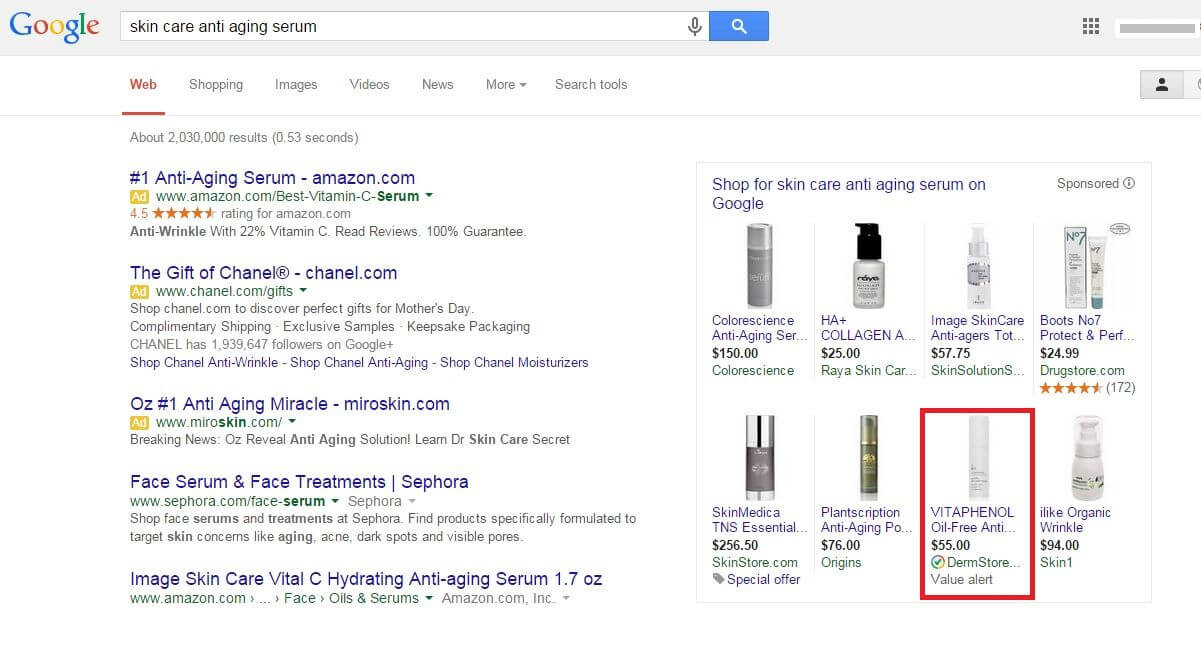
Google has another test running on product listing ads, this time one that highlights “value” products.
Spotted by Elizabeth Marsten at CommerceHub on Thursday, the test displays a “Value alert” message at the bottom of the ad. What’s interesting is that the ad from the DermStore does not have the lowest product price among the ads shown. The ad shown from Raya Skin Care has by far the lowest price at $25.00. Rather it may be that Google is testing a new way of showing items that are on sale or significantly discounted.
A look at the product page on DermStore.com does show sale prices on that brand (there is not a Vitaphenol serum listed on the site, though, and it’s not clear which product is showing in the search results). The “Value alert” message may only trigger based on the size of the discount; the Vitapehenol products on sale are currently discounted by 52 percent. It’s also not clear if the advertisers’ TrustedStores status has anything to do with inclusion in the test.
The experiment does appear to be very limited at this point. I haven’t been able to get it to trigger, and Marsten says she wasn’t able to get it to display again in subsequent searches.
Google declined to offer details when we asked about it, but we’ll update here if we learn anything more.

How To Acquire A New Location & Avoid Screwing Up The Local SEO

Expanding your business by acquiring a new location? Columnist Andrew Shotland discusses how to preserve its existing search equity while rebranding.


new-location-ss-1920
Acquisition of competitor locations is a common growth strategy for multi-location businesses, providing quick entry into a market, economies of scale, etc. Typically, you’ll know exactly how much you can pay for a location — unless, of course, you don’t have good understanding of how easy it is to screw up its local rankings. It’s not uncommon for an acquisition that looks good on paper to look absolutely horrible on Google, often making the price a lot higher than expected.
If you’re going to buy some new locations, you would do well to hand this to-do list over to your deal guys and whomever is managing the digital part of the transition:

1. Get The Old Domain In The Deal & Keep It Live

Goes without saying right? Wrong. I can’t tell you how many times we have been brought in post-acquisition, and the old domain (which is typically the old brand) is 404ing. The seller stopped paying the hosting bill, and the acquirer didn’t even think about it because they were going to use their brand’s domain.
There’s no quicker way to lose organic, referral, social and direct traffic than turning off the old site. At a minimum, you should 301 redirect the old site to your new site, or to the page for the new location on your site.

2. Get Old Corporate Links In The Deal

If the old brand was part of a multi-location company and had a single landing page on the corporate site, then see if your Biz Dev guys can get the seller to agree to 301 redirect the landing page on their site to the new location page on your site.
If you can’t get that, then at least see if you can get them to agree to link from their site to the new location page on your site for at least a few months after the deal closes to keep the link juice flowing during the transition.

3. Get The Old Phone Numbers In The Deal

Consistent NAP (Name, Address, Phone) data is a critical part of local SEO. When you rebrand a local business, you often go through a ranking rollercoaster as Google encounters inconsistent NAPs throughout the Web.
Keeping the phone numbers consistent can help. Also, if the business had print ads displaying phone numbers, those numbers may continue to generate leads for some time that you’ll want to capture.

4. Get Access To The Old Google My Business & Citation Pages In The Deal

It still blows my mind that, in 2015, you can spend a huge amount of money buying a business and not get the login for its Google My Business (GMB) page or its local citation profiles (e.g. Yelp, YP.com, etc.).
When you buy a car, you typically ask for the keys, right? Ask for the GMB and citation keys, too! In writing.

5. Get Access To The Old Google Analytics Data In The Deal

Funny story. A new client calls me up. Can’t get into her Google Analytics (GA) to give us the access we had requested. Turns out a former (disgruntled) employee has the login and wants $60,000 to give her access!
We worked it out with Google, and the blackmailer got bupkis. But come on, people — ask for access to the Google Analytics data… in writing! It’s easy enough to set up a new GA profile, but the historical data might be of interest to you.

6. Do NOT Mark The Old Business’ GMB Page As “Closed” *

For some reason, new owners love to mark the old brand’s Google My Business page as CLOSED. I am thinking there’s a certain perverse satisfaction in erasing the old brand from existence.
Too bad all this does is show that the place you just spent your hard-earned simoleons on is CLOSED. Remember, just because your brand is super-duper catchy doesn’t mean that people won’t still be searching for the old brand — and they’ll probably be searching for a long time.
A better strategy would be to update the old brand’s description to say that it is now known as your brand.

7. Do NOT Mark The Old Business’ Citation Pages As “Closed”

See the previous note, except now do this on every key local search site you can find like Yelp, YP.com, Abumba, etc. Fun work. Might want to use some local listings management tools for this step!

8. Update The NAP At The Main Business Aggregators First

When you update a business’ NAP information at the companies that supply the base set of business listings to many of the major local search services — Acxiom, D&B, Factual, InfoGroup, and Neustar Localeze — it can often take a long time for that data to make it out onto the Web in places Google can find. We tell clients that they should expect to see the results of data aggregator updates in about 90 days; in reality, however, many of the publishers that use this data update it sporadically, so there’s no telling when it will show up.
If you want to be really on top of your game, you may even consider updating the NAP at the aggregators before you rebrand. This could cause a bit of turbulence early on, but should make for a smoother transition once the new brand is launched.

9. Update The Old Business Citation Pages Next

Forgetting about the old brand’s citation profiles on the major local directories is one of the most common mistakes I see in rebranding. If you got the log-ins to these profiles in the deal (you got ‘em, right?), then go in and update the business name and any other pertinent info.
Make sure you note somewhere in the description that this location was formerly known as the old brand. People are still going to search for the old brand, and you want to make sure these profiles still show up on the local search sites and in Google for these queries. I have seen businesses lose a ton of lead volume instantly by no longer showing up for these old brand queries in local search sites.

10. Update The Old Google My Business Page *

Now that you have seeded the Local Search ecosystem with your new NAP, it’s time to update the old brand’s GMB page. Remember, do not mark it as “Closed.” Just update the business name and other changed NAP info, and be sure to mention the old brand name in the description.
Of course, this kind of thing never goes quite as planned, so be sure to set expectations that this will be a bit of a SEO rollercoaster ride. Good luck!

* As noted in the comments, these items are technically against Google’s guidelines and rebranding the old GMB page may get over-ridden by Google, often via Google Mapmaker editors. If the GMB page gets closed by MapMaker editors then you should try to get it re-opened and continue on with what you are doing (that’s why getting the phone number & domains is important because it supports the claim that you own the listing when they call the location). And if you just keep hitting a brick wall with this, then just create a new listing and get them merged (again, having the old phone # is key) by getting on the phone with Google Local support.
Source: http://selnd.com/1JC1YvF

15 Places You Should Be Sharing Your Blog Posts (Other Than Facebook And Twitter)

Simply writing and publishing blog posts isn’t enough. There’s so much digital noise out there today that this isn’t an “if you build it, they will come” kind of thing. Your work has only begun once you hit the “Publish” button – now, it’s time to promote your work.
For most bloggers, the natural first step is to share their content on Facebook and Twitter – but after this, many writers are at a loss. If all you’re doing is showcasing your blog posts on these sites, you’re missing out on the thousands of potential views that could come from sharing on other platforms.
Here are 15 additional places you should be sharing your blog posts:

SlideShare

Turn your blog post into a slideshow presentation using PowerPoint or other software, and share the resulting document on SlideShare. Quality content presented in this format stands out, and there’s less competition on SlideShare than on other sites.
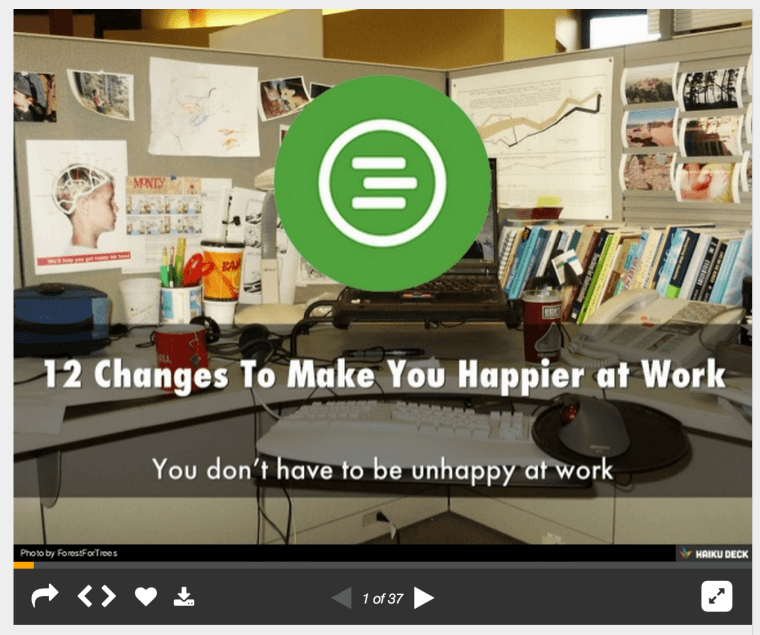
Here’s an example of a blog post that When I Work (my company) turned into a Slideshare presentation:
When I Work Example

Visual.ly

Not only is Visual.ly dedicated to helping companies create infographics and other types of visual content, it also provides a community for sharing these files. By turning your blog content into infographics or other visual content pieces and sharing them on this site, you’ll dramatically increase your blog’s exposure.

LinkedIn Groups

Sharing your content in LinkedIn Groups offers you targeted exposure beyond your usual list of connections. Just be sure the group welcomes shared content, and make sure the post is relevant to the group topic. Being perceived as a spammer on these sites won’t do any favors for your brand.

Pinterest

Pinterest’s active community makes this a great place to build traffic. By posting an attractive, relevant picture with a link to your post, your shareable image can help bring readers to you.

Instagram

Instagram is another visual sharing site similar to Pinterest – use the same strategy you’d use to get your content noticed there and on Twitter on this site. Instagram has a strong reach into the teen and young adult demographics, making it a very attractive content sharing option for brands.

Triberr

If you need traffic fast, look no further than Triberr. This platform is a social network where joining targeted “tribes” can help you build relationships with other bloggers and earn traffic by sharing others’ content.

StumbleUpon

StumbleUpon is a social network that allows users to browse random web pages by clicking the “Stumble” button. Add your content to the network, and if users like it (as noted by their ratings of your post), it’ll become more likely to appear in the random search rotation. It’s an easy way to drive credibility andincrease readership.

Google+ Communities

Google+ is another social networking tool that can be used to expand the reach of your blog. By posting into targeted Google+ communities, you’ll get your content pieces in front of interested readers in order to boost traffic. Again, though, be careful of coming off as too self-promotional. Post unique content to Google+ and be sure that any shares you post offer legitimate value to your followers.

BizSugar

If you blog about small business in some way, consider sharing your post to BizSugar. This site is designed to help bloggers share small business news and tips, making it a great place to find new readers if this is your target audience.

Your Email List

By using a lead magnet – a valuable free giveaway that’s provided in exchange for your followers’ email addresses – it’s easy to build a list of subscribers who are interested in your content and your industry. When you have new blog content, share it with your list via email. If you post frequently, consider sending weekly or biweekly updates to avoid overwhelming your subscribers with messages.

Scoop.it

Scoop.it is one of the places web users head to when they’re looking for new, interesting content, making it a great place to publish your blog posts. You can start using the program for free, but these “freemium” accounts are limited to one topic. For $11/month, you can upgrade to five topics, while business accounts with 15 topics are $67/month.

Niche-Based Social Bookmarking Sites

Depending on your particular focus, you can post to a variety of social bookmarking sites. Inbound.org, for example, is great for SEO, SMO, blogging, and internet marketing. ManageWP.org is a good place to post WordPress-related articles, while DesignFloat is perfect for web designers, and DZone is a good fit for developers.

Blog Engage

Blog Engage is a site that lets you publish blog posts on a wide variety of topics for others to read. Everything from finance to anime to cosmetics is covered, so no matter what your focus is, you can find an audience of potential new readers on this blog sharing website.

Industry-Specific Social Networks

Apart from niche-based social bookmarking sites, some industries have their own specific social networks where they share information, help each other, and offer advice. Active Rain from Trulia, for example, is a network created exclusively for Realtors. If your industry has a similar network, be sure you’re sharing your work there.

Reddit

Finally, if you have a specific niche, there’s likely a Reddit sub-forum for it. That said, Redditors (the site’s users) can be very intense, so make sure the content you share is very targeted, very high-quality and completely free of “marketing-speak”. The site has a HUGE amount of traffic, so if you can gain credibility, this can be a great source of readership for your blog.
Finding places to share your blog posts isn’t difficult – the internet is an enormous place with a tremendous number of opportunities. Just be sure that your content is relevant to the specific community you target and meets stringent quality guidelines before sharing. When you do so, you’ll discover that there are thousands of potential readers available out there for you that you’d never meet by sticking to Facebook and Twitter alone.
Are there any other online resources you use to share your content? Leave a comment below with your recommendations!