Thursday, 26 March 2015

Digital Marketing Strategies To Your Business Grow Easier

Digital marketing is essential in today's world. With both competitors and potential customers constantly online, digital marketing is the only way to stay ahead. When you're a small business owner the online world can seem intimidating. Here is a list of five simple digital marketing strategies that any business owner can implement to help their business grow.
Digital Marketing Strategies To Your Business Grow Easier

1. Setting a Goal: You're looking for ways to help your small business grow. You might want more customers, more recognition or maybe you're looking to get ahead of the competition. Whatever the case may be, starting with a solid goal in mind greatly increases your chances of success. Digital marketing is a great way for small businesses to prosper, but going into the process blindly can leave you with a jumbled mess. A lot of strategy and precision goes into digital marketing and having a goal helps you know what to focus on.
2. Creating a Marketing Funnel: The most successful businesses have an effective marketing funnel in place. A marketing funnel is when you map out a customer's journey from when a customer is a complete stranger to when they become a lead, and then put certain strategies in place that will encourage them to move through this funnel. Things like lead magnets, calls to action, opt-ins and offers are all effective pieces of a funnel. You can think of a marketing funnel in four parts: Awareness, Interest, Desire, and Action.
  • Awareness: The potential customer is aware of your product or service. They're still a stranger, but they've come to your website for a reason. They're looking for something they need. At this stage you want to attract the customer by showing them that you have something they're looking for. Use a lead magnet or call-to-action to give the customer a valuable resource related to your product or service (i.e: what they need) in exchange for more information about them like their email address, phone number, profession and current needs. Find out who they are and why they came to your website.
  • Interest: They are actively expressing interest in a certain type of your products or services. At this point you've given them some information and they're interested in what you have to say or the services you provide. You've used your lead magnet or CTA in stage one to gather more information about them. At this stage it's a good idea to supply them with further information that is more tailored to their specific needs. Showing them that you not only took the time to get to know them, but also have something that's specific to their needs will show that you're attentive to and care about your customer's wants and needs.
  • Desire: They've taken an interest in a specific product or service. Now that you've supplied them with information specific to what they're looking for, they've found a product or service you provide that might be a good fit for them. Invite them to schedule a consultation using an email or a call-to-action. At this stage you want to tell them more about the product or service they're interested in. Show them why they need it and exactly how it will benefit them.
  • Action: Taking the next step towards purchasing. This is when you're able to turn your potential customer into a lead. You've given them valuable information, shown them you pay attention to your customer's needs, and shown them that you have something they need that will benefit them. All that's left is discussing things like price, payment and other aspects of your product or service that are relevant to a buyer.
Having an effective marketing funnel won't just get you more leads, it can also help you turn leads into repeat buyers. If the customer has a good experience they might return to purchase from you again or even tell others they know about your business. The elements of a marketing funnel can seem like a lot to put together, but they're simple concepts when broken down. You'll see that numbers 3,4 and 5 help to break down and explain the different aspects of having a marketing funnel in place on your site and how to put together some of the most important pieces of it.
3. Developing a call-to-action: We talked about using a call-to-action in the second step as a part of your marketing funnel, but what is a call-to-action exactly? A call-to-action (CTA) is an image or text that prompts visitors to take action, such as subscribe to a newsletter, view a webinar or request a product demo. CTAs should direct people to landing pages, where you can collect visitors' contact information in exchange for a valuable marketing offer. In that sense, an effective CTA results in more leads and conversions for your website. This path, from a click on a CTA to a landing page, illustrates the much desired process of lead generation. In order to increase visitor-to-lead conversion opportunities, you need to create a lot of calls-to-action, distribute them across your web presence and optimize them. A good CTA should be attention grabbing and help lead a potential customer further into your marketing funnel.
4. Creating an Effective Lead Magnet: A lead magnet can be used alone or along with a CTA. This will also be used either within your marketing funnel or as a way to drive potential customers into your funnel. Supply them with something relevant to your product or service that they want. Use your offers as a way to gather more information about a potential buyer while driving them further into your funnel at the same time. This brings them closer to becoming an actual quality lead who will spend money on your product or service. The idea behind a lead magnet is to trade information. You supply something like a free download of a white paper, but in order to complete the download the individual has to fill out a form that will provide you with more information about them. You'll use the information you gather to interact with them more as they progress through your funnel.
5. Driving Traffic: In order for there to be people to drive into your marketing funnel, there first has to be traffic on your website. There a variety of ways you can drive traffic to your website. Here are a few of the ones I recommend:
  • Quality Content: Use content such as blog posts, press releases and articles on authority websites. Insert links to various places on your website within this content to build your brand name through exposure and drive traffic to your website.
  • Keyword Strategy: Inserting related keywords into content will help your content and website show up in more search results, this leads to higher volumes of web traffic.
  • Website Optimization: Ensuring that your website is optimized and functioning at it's best is essential. People don't want to visit a website that doesn't work properly.
  • Social Media: Use engaging social media posts to attract more traffic to your site. Using pictures, video, and other relevant media will help your posts get more engagement.
Try these simple digital marketing strategies out on your website and see for yourself how much of a difference they can make. If you want your business to grow, digital marketing is the place to start.


Source: http://www.huffingtonpost.com/roger-bryan/5-simple-digital-marketin_b_4816425.html?ir=India

Build Sites with Quality Content Rather than Quality Links – Says Google

Since SEO started, focus has always been on building quality links for your website. People rush like mad building 100’s and 1000’s of links.
But that does not make sense, right. Even Google thought so and thus, it has come up with a new video which highlights that people should focus on building sites with quality content rather than focusing on building links.
Check out the video below to know more:


Source: http://www.futuredigitalmarketing.com/

Monday, 2 March 2015

The Importance Of Search Data In Your Marketing


When it comes to data utility, search has other digital marketing channels beat hands down. Contributor Alistair Dent explains how to use this and other bits of customer data without spending big bucks.

analytics-marketing-data-technology-ss-1920
I’m not going to lie, search has better data than any other digital channel.
Search might not have third-party data, as much contextual data, viewability stats or engagement/rollover metrics; but search queries are more informative because they provide accurate information about users and their mindsets.
Get your search data into your other channels.
When we categorize keywords, we tend to put them into three separate groupings:
  • Keyword type (e.g. navigational, transactional or informational).
  • Intent (buy now, best, cheapest, etc).
  • Product type (home insurance vs car insurance).
Armed with this knowledge about what a person has searched for, we know how to treat them. If it comes down to a “data shootout”, search is the strongest contender.
If I have a user who has browsed my pages about personal loans but searched for “savings accounts,” I need to choose whether I want to talk to him about loans or savings. Since one of those is a direct unambiguous signal from the user saying “tell me about this,” loans win every time.
So search is valuable. Nobody is shocked by that concept. What people rarely do is follow up the next step. To take advantage of your digital marketing opportunities, you must get your search data into your other channels.
When I’m serving a display ad, it helps to know what that person searched for. When I’m running a YouTube ad, of course any search queries are relevant.
Several technologies exist to help with this, but they’re all expensive or complicated. Sometimes they’re right, sometimes they’re overkill.
Over on Marketing Land we’re focussing a series of articles on this subject, about how data interacts and can/should be shared, and how you can do it without enterprise-level data resources.
Visit here to read the full first installment of the series, and keep checking back as we explore the entire marketing data landscape and how you can leverage it for your business.

Some opinions expressed in this article may be those of a guest author and not necessarily Search Engine Land. Staff authors are listed here.

Source:  http://searchengineland.com/importance-search-data-marketing-214840

Tips For Optimizing Content In Mobile Commerce SEO

This month, a lot of mobile commerce sites are being put to the test for the first time. Mcommerce sites are expected to cross the 10% mark in their contribution to online retail sales, and retailers will be collecting usage data to figure out what users like and dislike.
In my own shopping experiences, both through mobile sites and mobile apps, I’m finding a consistent theme running through the product pages I see: retailers are unsure how to handle product descriptions.
It’s a fact of life that mobile screens are small, and I’ve recently looked at how that impacts decisions about SEO and mobile content.

“Hide-and-seek” Content

Retailers are trying different approaches with respect to the design of their description areas. Some hide them completely, providing a “more info”-type link to keep the clutter to a minimum. Others provide a small sample of the description, while a few brave souls actually include the entire text – sometimes several screens worth.
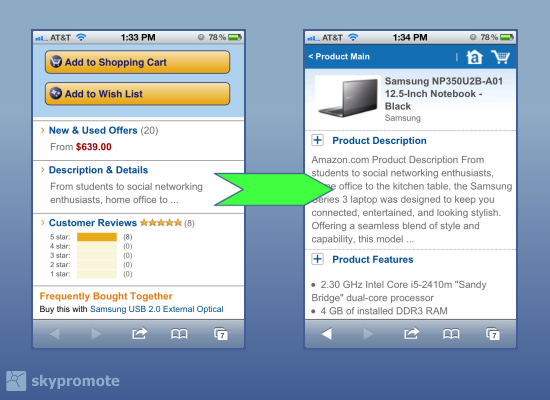
Amazon Mcommerce product pages
Amazon's mcommerce site provides a very short on-page description, linking to a second page for more details.
While these approaches deal with user interface issues, they’re all trying to fix a fundamental problem: mobile sites are using product descriptions created for desktop sites. And quite often, these descriptions are already second-hand, pulled from offline catalogs, manufacturer databases, or print brochures that promote the product. Sometimes they’re long, sometimes short, but they’re often not optimized for search, or edited to fit the needs of mobile users.

Specific Pitfalls With Mobile SEO

Here are some red flags to look for when evaluating product descriptions for an mcommerce site:
  • Descriptions from the manufacturer. You’ll find these copied at all your competitor websites. Google dismisses duplicated content from natural search listings, so you’ll be completely reliant on shopping results as your non-paid channel.
  • Marketing lingo. Often a symptom of manufacturer-supplied content. Filled with brand attributes but no descriptive keywords.
  • Lists of specs. A common pitfall for B2B, or any technology product.

How To Manage Wholesale Revisions

Once you’ve identified problem areas, you can start to plan what resources you’ll need to make changes. There are lots of ways to manage the workflow for a wholesale upgrade of your product copy:
  • In-house staff. Either full-timers or interns. This is the direct approach, and produces consistent results, but it can get expensive.
  • User-generated edits. Think Wikipedia, where readers suggest edits to make the description better. This is clever and cheap, but you need a very large audience to get enough activity. Plus, moderation is necessary to keep the quality up.
  • Crowdsourcing. My personal favorite. Revising large numbers of products is an ideal project for a team of remote workers, who can log-in on their own time and tackle them a few at a time. Crowdsourcing tools are difficult to master, but once you nail down a process, you can plow through thousands of SKUs in a few weeks, with good quality results and no need for extra staff.

Pick Your Battles

Whatever method you choose, costs are an important consideration. Creating content – even in bite-size chunks – can get expensive. And that cost has to be justified by ROI.
So how do we prioritize a project where there might be thousands of SKUs to look at?
Mcommerce product page designs
Clockwise from top left: Buy.com is very text-heavy, while Best Buy only has specs. Walmart.com has a good balance of copy and specs.
Let’s start with the highest priority fixes, and work our way down:
  • Top sellers. You could sort this by sheer volume of sales, or their contribution to profits – whatever defines business success for your store.
  • Word count. The longest descriptions probably good candidates for a “long-story-short” version.
  • Lack of category name in the text. This is a good indication that the description lacks keywords. Most mcommerce sites are run from a database, so a script that looks for category names in the text can be quick way to assess this.
  • Ratio of numbers to letters. For technical products (especially B2B) a lot of numbers in the description (say, 20%) mean you’re probably looking at a spec sheet.
So now you’ve identified the your mobile commerce site’s issues, chosen a method for manage the workflow, and singled-out the products that need revising. Now you can circle back to the “hide-and-seek” design issue, and adapt your page designs to fit the content.
I’ll get into that in the next column, but if you’d like a sneak preview of the factors we’ll be talking about, have a look at my past article on using JQuery Mobile for SEO.

Some opinions expressed in this article may be those of a guest author and not necessarily Search Engine Land. Staff authors are listed here.

Google Updates: Google Search Algorithm Adds Mobile-Friendly Factors & App Indexing To Ranking

Google's mobile ranking algorithm will officially include mobile-friendly usability factors and app indexing. Making sure your site is mobile-friendly is now more important than ever.
Google announced it is making two significant changes to its search algorithm for ranking the mobile search results.
Google will be using mobile-friendly factors in its mobile search results starting on April 21, 2015, and it will rank mobile apps participating in App Indexing for signed-in users better in the mobile search results starting today.
Mobile-Friendly Web Sites To Rank Better In Mobile Search
Mobile Apps That Google Indexes To Rank Better In Mobile Search

Google said that on April 21, 2015, Google’s mobile ranking factors will not only label your site as mobile-friendly, but will also use that to determine if your site should rank higher in the search results. Google said this algorithmic change will have a “significant impact” in the mobile search results, impacting all languages worldwide.
Google said this is expanding on its mobile ranking demotion algorithm launched back in 2013.
Google also said “users will find it easier to get relevant, high quality search results that are optimized for their devices.”
Why not now? Google said it wants sites to prepare; so, you have a few months to get your websites mobile-friendly. Google told us it had been experimenting with mobile ranking factors recently, and now it is here.
To prepare, you can use Google’s mobile usability reports and the mobile friendly testing tool. You can also see Google’s mobile guidelines.
Google further said that starting right now, apps that are indexed by Google through App Indexing will begin to rank better in mobile search. Google said this only will work for signed-in users who have the app installed on their mobile devices, which means only Android apps today. Google explained this “may now surface content from indexed apps more prominently in search.”
To learn more about how to get your apps indexed by Google, see this help area.

Source:  http://searchengineland.com/google-search-algorithm-adds-mobile-friendly-factors-app-indexing-ranking-215573