Monday, 27 April 2015

Google’s New Mobile Breadcrumb URLs

Google’s New Mobile Breadcrumb URLs: Making the Most of Your Site Name & URL Structure


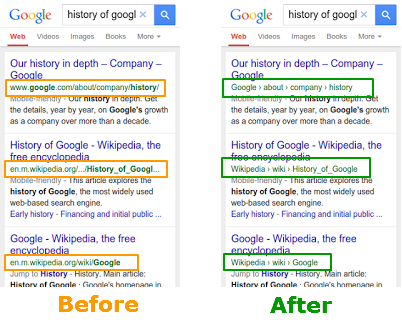
Two more changes are coming to Google mobile search results, the search engine announced last week — this time to the way URLs are displayed.
  • Mobile search results no longer show the actual page URL, but instead show a breadcrumbs-like format of the URL structure. This is rolling out worldwide.
  • The breadcrumbs-like information can show the site name in place of the domain name. This is rolling out in the U.S. only for now.
These before and after examples from Google’s announcement post on the Google Webmaster Central blog show what’s changing:
breadcrumb-url-example
URL structure replaced by breadcrumb format in Google mobile search results
The change replaces a SERP result’s URL with a description of the page’s location in a “breadcrumbs-like format.” The exciting part of this announcement for online marketers is that you can control your displayed breadcrumb URLs and site name using Schema.org structured data. Google’s Gary Illyes gave an enthusiastic explanation:
gary-illyes-mobile-url
Google Webmaster Trends Analyst Gary Illyes shares the news.

Change #1: Breadcrumbs Format instead of URL Structure

Google now displays the breadcrumbs-like format instead of URLs in mobile search results, period. The search engine has been testing this formatting for years in web and mobile search, and they’ve decided to implement it worldwide for mobile searches. Therefore, whether your site has marked up its pages with structured data or not, Google shows a breadcrumb format in place of your URL structure.
You can specifically control how the breadcrumb URL appears if you add Schema.org markup to the HTML on your pages. Refer to Schema.org’sbreadcrumbs structured data for details; you can also find instructions in Google Developers Help, although at the time of this writing, the page was not up-to-date:
google-breadcrumb-documentation
A Google Developers reference for Breadcrumb structured data markup can be found here: https://developers.google.com/structured-data/breadcrumbs.
But what if you don’t (yet) have schema markup on your site? Without structured URL data to refer to, Google will display whatever structure it feels best represents the way that page fits in your site.Google primarily bases this on:
  • Actual page URL, and/or
  • Breadcrumb navigation on the page

Well Structured URLs for the Win

Google looks for clues starting with the page URL itself. If you have organized your website content in a physical silo structure, with folders arranged in a logical way, then you have a big advantage. Even your naked URLs reveal a lot of information. As a best practice, the directories leading to your page should communicate a clear idea of what your page is about, both to the search engines who crawl your URL path and to visitors who see the URL in their browser address bar.
For example, compare the well-structured URL (top) to the flat directory structure below it:
  • com/engine-parts/cooling/audi-a6-quattro-engine-timing-belt-kit.html
  • com/cooling-audi-a6-quattro-engine-timing-belt-kit.html
Notice how, in the first URL, the folders “engine-parts” and “cooling” provide context for the name of this product page. We know that this product falls within the category of engine parts used for cooling.
A well-structured URL doesn’t have to be many levels deep to communicate what a page is all about. In fact, keeping pages within a few clicks of the home page is a recommended SEO best practice (three to five clicks deep is a good maximum guideline, though very large sites may need more). Flattening your URLs so that everything is on one level, as in the second URL above, creates chaos. There are many reasons to havestructured URLs versus a flat directory structure, and Google’s latest announcement adds another reason to the list.

Breadcrumb Navigation Leads to SEO Success

Does your site have breadcrumb navigation links at the top of each page? Those little links help search engines understand your site structure in a powerful way. Breadcrumb links pass link equity within your site to reinforce your silo strategy. Showing a logical breadcrumb path on every page of your site naturally passes link juice up to your main landing pages. It also has a user-friendly benefit, since people can click there to find their way up to broader levels of content.
Now there’s another benefit to implementing breadcrumb navigation, and that’s to give Google a suggested format for a breadcrumb-structured URL.
Note: In cases where a page’s breadcrumbs do not match its structured URL, and there’s no schema markup to follow, we aren’t sure whether the breadcrumbs or URL would take precedence. Knowing Google, we believe the URL algorithm would make a judgment call influenced by the page content and possibly the user’s query. If anyone has real-life examples that shed light on this, please comment below.

Change #2: Site Name instead of Domain

The second part of Google’s announcement was that the new structured URLs could show “the real-world name of the site instead of the domain name.” This change only applies to mobile searches in the U.S. for now, but is likely to be distributed more widely.
Google’s own help topic for including your site name in search resultssays you can provide one or more names for your website using Schema.org markup on your official home page. If you provide more than one possible name, Google’s algorithm will choose between them for each result. However, specifying just one site name lets you control what is displayed at the beginning of your structured URL breadcrumbs in Google mobile search results. In the examples Google gave, “www.wikipedia.com” and “www.google.com” were simplified:
site-name-breadcrumb
A site name can be specified with structured markup.

Why Specify Your Site Name in New Breadcrumb URLs

The best reason to mark up your site name is for branding. You want people to recognize your business by name, and Google’s giving you another opportunity to be seen. It’s also a cleaner look — if you start your breadcrumbs-style URL with the business name, it allows more space for users to read the words that come next.
It’s easy to see that this shortened breadcrumb URL format will give major brands an advantage. Searchers can see a familiar and trustworthy name more clearly now that it’s not hidden between other characters, and as a result, recognizable brands may see their click-through rates on mobile improve.
Be sure to specify a true and natural name of your business, not anything deceptive. Interestingly, the comments on Google’s announcement post contained many predictions that spammers would take this and run with it. In other words, a small shoe manufacturer might specify the site name “Nike” and try to appear bigger than they are.
According to Google’s guidelines for specifying your site name, the website name (or names) you supply in your markup should meet certain criteria. Your site name must:
  • Be reasonably similar to your domain name
  • Be a natural name used to refer to the site, such as “Google,” rather than “Google, Inc.”
  • Be unique to your site — not used by some other site
  • Not be a misleading description of your site
Google can smell spam a mile away. Don’t be foolish enough to even try deceiving the search engines, or your site rankings will suffer. Instead, follow the guidelines, implement structured breadcrumb URLs your way, specify your site name, and take advantage of opportunities as they appear.

Thursday, 26 March 2015

Digital Marketing Strategies To Your Business Grow Easier

Digital marketing is essential in today's world. With both competitors and potential customers constantly online, digital marketing is the only way to stay ahead. When you're a small business owner the online world can seem intimidating. Here is a list of five simple digital marketing strategies that any business owner can implement to help their business grow.
Digital Marketing Strategies To Your Business Grow Easier

1. Setting a Goal: You're looking for ways to help your small business grow. You might want more customers, more recognition or maybe you're looking to get ahead of the competition. Whatever the case may be, starting with a solid goal in mind greatly increases your chances of success. Digital marketing is a great way for small businesses to prosper, but going into the process blindly can leave you with a jumbled mess. A lot of strategy and precision goes into digital marketing and having a goal helps you know what to focus on.
2. Creating a Marketing Funnel: The most successful businesses have an effective marketing funnel in place. A marketing funnel is when you map out a customer's journey from when a customer is a complete stranger to when they become a lead, and then put certain strategies in place that will encourage them to move through this funnel. Things like lead magnets, calls to action, opt-ins and offers are all effective pieces of a funnel. You can think of a marketing funnel in four parts: Awareness, Interest, Desire, and Action.
  • Awareness: The potential customer is aware of your product or service. They're still a stranger, but they've come to your website for a reason. They're looking for something they need. At this stage you want to attract the customer by showing them that you have something they're looking for. Use a lead magnet or call-to-action to give the customer a valuable resource related to your product or service (i.e: what they need) in exchange for more information about them like their email address, phone number, profession and current needs. Find out who they are and why they came to your website.
  • Interest: They are actively expressing interest in a certain type of your products or services. At this point you've given them some information and they're interested in what you have to say or the services you provide. You've used your lead magnet or CTA in stage one to gather more information about them. At this stage it's a good idea to supply them with further information that is more tailored to their specific needs. Showing them that you not only took the time to get to know them, but also have something that's specific to their needs will show that you're attentive to and care about your customer's wants and needs.
  • Desire: They've taken an interest in a specific product or service. Now that you've supplied them with information specific to what they're looking for, they've found a product or service you provide that might be a good fit for them. Invite them to schedule a consultation using an email or a call-to-action. At this stage you want to tell them more about the product or service they're interested in. Show them why they need it and exactly how it will benefit them.
  • Action: Taking the next step towards purchasing. This is when you're able to turn your potential customer into a lead. You've given them valuable information, shown them you pay attention to your customer's needs, and shown them that you have something they need that will benefit them. All that's left is discussing things like price, payment and other aspects of your product or service that are relevant to a buyer.
Having an effective marketing funnel won't just get you more leads, it can also help you turn leads into repeat buyers. If the customer has a good experience they might return to purchase from you again or even tell others they know about your business. The elements of a marketing funnel can seem like a lot to put together, but they're simple concepts when broken down. You'll see that numbers 3,4 and 5 help to break down and explain the different aspects of having a marketing funnel in place on your site and how to put together some of the most important pieces of it.
3. Developing a call-to-action: We talked about using a call-to-action in the second step as a part of your marketing funnel, but what is a call-to-action exactly? A call-to-action (CTA) is an image or text that prompts visitors to take action, such as subscribe to a newsletter, view a webinar or request a product demo. CTAs should direct people to landing pages, where you can collect visitors' contact information in exchange for a valuable marketing offer. In that sense, an effective CTA results in more leads and conversions for your website. This path, from a click on a CTA to a landing page, illustrates the much desired process of lead generation. In order to increase visitor-to-lead conversion opportunities, you need to create a lot of calls-to-action, distribute them across your web presence and optimize them. A good CTA should be attention grabbing and help lead a potential customer further into your marketing funnel.
4. Creating an Effective Lead Magnet: A lead magnet can be used alone or along with a CTA. This will also be used either within your marketing funnel or as a way to drive potential customers into your funnel. Supply them with something relevant to your product or service that they want. Use your offers as a way to gather more information about a potential buyer while driving them further into your funnel at the same time. This brings them closer to becoming an actual quality lead who will spend money on your product or service. The idea behind a lead magnet is to trade information. You supply something like a free download of a white paper, but in order to complete the download the individual has to fill out a form that will provide you with more information about them. You'll use the information you gather to interact with them more as they progress through your funnel.
5. Driving Traffic: In order for there to be people to drive into your marketing funnel, there first has to be traffic on your website. There a variety of ways you can drive traffic to your website. Here are a few of the ones I recommend:
  • Quality Content: Use content such as blog posts, press releases and articles on authority websites. Insert links to various places on your website within this content to build your brand name through exposure and drive traffic to your website.
  • Keyword Strategy: Inserting related keywords into content will help your content and website show up in more search results, this leads to higher volumes of web traffic.
  • Website Optimization: Ensuring that your website is optimized and functioning at it's best is essential. People don't want to visit a website that doesn't work properly.
  • Social Media: Use engaging social media posts to attract more traffic to your site. Using pictures, video, and other relevant media will help your posts get more engagement.
Try these simple digital marketing strategies out on your website and see for yourself how much of a difference they can make. If you want your business to grow, digital marketing is the place to start.


Source: http://www.huffingtonpost.com/roger-bryan/5-simple-digital-marketin_b_4816425.html?ir=India

Build Sites with Quality Content Rather than Quality Links – Says Google

Since SEO started, focus has always been on building quality links for your website. People rush like mad building 100’s and 1000’s of links.
But that does not make sense, right. Even Google thought so and thus, it has come up with a new video which highlights that people should focus on building sites with quality content rather than focusing on building links.
Check out the video below to know more:


Source: http://www.futuredigitalmarketing.com/