Monday, 2 March 2015

Tips For Optimizing Content In Mobile Commerce SEO

This month, a lot of mobile commerce sites are being put to the test for the first time. Mcommerce sites are expected to cross the 10% mark in their contribution to online retail sales, and retailers will be collecting usage data to figure out what users like and dislike.
In my own shopping experiences, both through mobile sites and mobile apps, I’m finding a consistent theme running through the product pages I see: retailers are unsure how to handle product descriptions.
It’s a fact of life that mobile screens are small, and I’ve recently looked at how that impacts decisions about SEO and mobile content.

“Hide-and-seek” Content

Retailers are trying different approaches with respect to the design of their description areas. Some hide them completely, providing a “more info”-type link to keep the clutter to a minimum. Others provide a small sample of the description, while a few brave souls actually include the entire text – sometimes several screens worth.
Amazon Mcommerce product pages
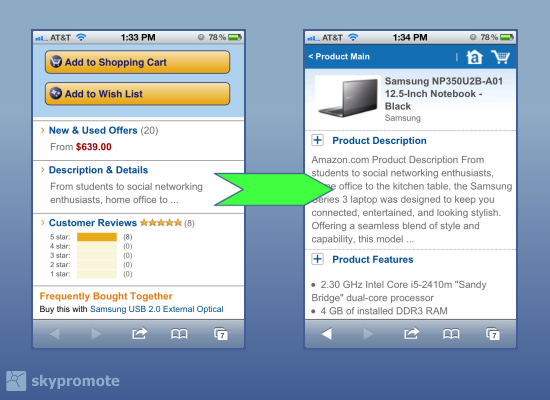
Amazon's mcommerce site provides a very short on-page description, linking to a second page for more details.
While these approaches deal with user interface issues, they’re all trying to fix a fundamental problem: mobile sites are using product descriptions created for desktop sites. And quite often, these descriptions are already second-hand, pulled from offline catalogs, manufacturer databases, or print brochures that promote the product. Sometimes they’re long, sometimes short, but they’re often not optimized for search, or edited to fit the needs of mobile users.

Specific Pitfalls With Mobile SEO

Here are some red flags to look for when evaluating product descriptions for an mcommerce site:
  • Descriptions from the manufacturer. You’ll find these copied at all your competitor websites. Google dismisses duplicated content from natural search listings, so you’ll be completely reliant on shopping results as your non-paid channel.
  • Marketing lingo. Often a symptom of manufacturer-supplied content. Filled with brand attributes but no descriptive keywords.
  • Lists of specs. A common pitfall for B2B, or any technology product.

How To Manage Wholesale Revisions

Once you’ve identified problem areas, you can start to plan what resources you’ll need to make changes. There are lots of ways to manage the workflow for a wholesale upgrade of your product copy:
  • In-house staff. Either full-timers or interns. This is the direct approach, and produces consistent results, but it can get expensive.
  • User-generated edits. Think Wikipedia, where readers suggest edits to make the description better. This is clever and cheap, but you need a very large audience to get enough activity. Plus, moderation is necessary to keep the quality up.
  • Crowdsourcing. My personal favorite. Revising large numbers of products is an ideal project for a team of remote workers, who can log-in on their own time and tackle them a few at a time. Crowdsourcing tools are difficult to master, but once you nail down a process, you can plow through thousands of SKUs in a few weeks, with good quality results and no need for extra staff.

Pick Your Battles

Whatever method you choose, costs are an important consideration. Creating content – even in bite-size chunks – can get expensive. And that cost has to be justified by ROI.
So how do we prioritize a project where there might be thousands of SKUs to look at?
Mcommerce product page designs
Clockwise from top left: Buy.com is very text-heavy, while Best Buy only has specs. Walmart.com has a good balance of copy and specs.
Let’s start with the highest priority fixes, and work our way down:
  • Top sellers. You could sort this by sheer volume of sales, or their contribution to profits – whatever defines business success for your store.
  • Word count. The longest descriptions probably good candidates for a “long-story-short” version.
  • Lack of category name in the text. This is a good indication that the description lacks keywords. Most mcommerce sites are run from a database, so a script that looks for category names in the text can be quick way to assess this.
  • Ratio of numbers to letters. For technical products (especially B2B) a lot of numbers in the description (say, 20%) mean you’re probably looking at a spec sheet.
So now you’ve identified the your mobile commerce site’s issues, chosen a method for manage the workflow, and singled-out the products that need revising. Now you can circle back to the “hide-and-seek” design issue, and adapt your page designs to fit the content.
I’ll get into that in the next column, but if you’d like a sneak preview of the factors we’ll be talking about, have a look at my past article on using JQuery Mobile for SEO.

Some opinions expressed in this article may be those of a guest author and not necessarily Search Engine Land. Staff authors are listed here.

Google Updates: Google Search Algorithm Adds Mobile-Friendly Factors & App Indexing To Ranking

Google's mobile ranking algorithm will officially include mobile-friendly usability factors and app indexing. Making sure your site is mobile-friendly is now more important than ever.
Google announced it is making two significant changes to its search algorithm for ranking the mobile search results.
Google will be using mobile-friendly factors in its mobile search results starting on April 21, 2015, and it will rank mobile apps participating in App Indexing for signed-in users better in the mobile search results starting today.
Mobile-Friendly Web Sites To Rank Better In Mobile Search
Mobile Apps That Google Indexes To Rank Better In Mobile Search

Google said that on April 21, 2015, Google’s mobile ranking factors will not only label your site as mobile-friendly, but will also use that to determine if your site should rank higher in the search results. Google said this algorithmic change will have a “significant impact” in the mobile search results, impacting all languages worldwide.
Google said this is expanding on its mobile ranking demotion algorithm launched back in 2013.
Google also said “users will find it easier to get relevant, high quality search results that are optimized for their devices.”
Why not now? Google said it wants sites to prepare; so, you have a few months to get your websites mobile-friendly. Google told us it had been experimenting with mobile ranking factors recently, and now it is here.
To prepare, you can use Google’s mobile usability reports and the mobile friendly testing tool. You can also see Google’s mobile guidelines.
Google further said that starting right now, apps that are indexed by Google through App Indexing will begin to rank better in mobile search. Google said this only will work for signed-in users who have the app installed on their mobile devices, which means only Android apps today. Google explained this “may now surface content from indexed apps more prominently in search.”
To learn more about how to get your apps indexed by Google, see this help area.

Source:  http://searchengineland.com/google-search-algorithm-adds-mobile-friendly-factors-app-indexing-ranking-215573

Wednesday, 25 February 2015

Best Way To Write A Title Tag For Better Search Engine Optimization

What makes you read an article at once? What is that driving force that makes you feel that an article might be interesting? The answer to these questions is the title of an article. The title of a page is the most important constituent of an article which tells the search engine about the content of your page.

In order to increase the traffic on your page, that is to increase the number of visitors on your page, you need to have an effective title tagline for SEO and you also need to have an interesting title for the readers.
For example, if you Google “how to write a resume” the first and the top most search result will be the exact match of your search. The title for this article was molded in such a way that it appears at the top in the search list.   However when you go through the search results, you find 2nd and 3rd article titleds “How To Write A Resume, Resume Writing, Sample Resume” and “How to Make a Resume (with Free Sample Resumes)” respectively. Although the top result was taken by the exact match of our search, but this article even more click worthy since it includes words like “Free Sample Resumes“.
how to write a resume
Screenshot – april 10, 2013 (Google.com)
Note : By seeing the above picture you may argue that the first article has more chances of attracting the visitors because there is Google plus author profile linked to it, despite being simple compared with 2nd and 3rd search result. But my point here is only to compare the titles and see how effective is 2nd and 3rd results without considering the Google profile pic.
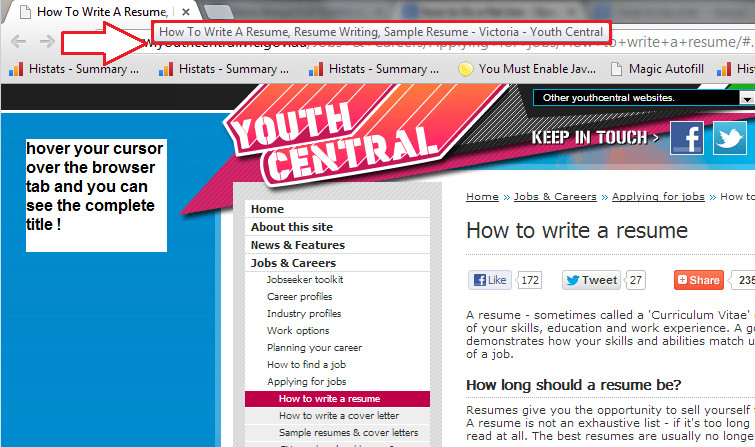
In the above example you can see the 2nd result – “How To Write A Resume, Resume Writing, Sample …. ” and if you want to see the complete title, just open the site in any browser and keep the cursor over the tab and you can see the see the complete title like the picture below:
browser cursor
The above mentioned example surely suggests on how you need to design your title, which not only appears among the top search results but also has an eye catching and interesting title to force the visitors to click on it.
Before jumping onto any conclusion regarding the process of making a title interesting and make it appear at the top of the search list, it is necessary to know a few details.

Meta Tags

These are XHTML elements that are used to deliver any information about the website’s page to the users of the website and search engines. These elements include
  • Title tag lines
  • Description
  • Keywords

Know about title tags

These are the part of Meta tags, which are present around the top most part in the HTML covered under the <head> area. Similar to the titles of the chapters that you have in a book, these title tags tells the search engines and the readers about the content of your page. It is the title tag of your page which will make the persons searching on the search engines to make a decision whether they must look into your page or not.
Not only this, title tag must contain some of the keywords which will enable search engines to understand what your page is all about. The title tags must be designed in such a way that they should appear catchy for the human eyes and should also be formatted according to the needs of search engines.
You must always remember that it is the title tag is the most important tag which tells the search engine about the content of your page. It is also equally important for your SEO strategy.
Here are some of the ways in which you may end up giving a good title to your page which will surely boost the traffic on your site.

Write a Reader Friendly Title

In the previous example we have already seen that the search result that came on top of the result was left behind by the one which was amongst the tops and also had an effective and interesting title added to its page. The title “10 east steps to make a cake” when referred to one’s website, does not sound as ambiguous as it appears to be in a search result.
Whenever you are writing a title tag for your page, there are bound to be several questions in your mind. Here, we try to answer the most important ones.
  • What are the norms about the length of the title tag?
The length of the article must not exceed 70 characters. Secondly, you should invest adequate thought in the placement of keywords.
At this point, you could ask – what if you are writing a language that goes from right to left? Or, what if your target audience is from a country having these language norms? Well, in these cases, you have to reverse the order.
  • How shall I go about the construction of the title tag in terms of placement of words?
The important and more descriptive of the keywords must come in the initial parts of the title tag, and the less important ones must be kept for the latter parts.
  • What if I need to use similar important words?
In such cases, you may use pipes in order to distinct important phrases. You must also see to it that you do not have any commas, exclamation mark, underscores or other punctuations in your tag.
  • Is using the name of my company in the title tag advisable?
Use the name of the company in the title tag only when the name forms a portion of your tag. Most of the SEO‘s advice to either leave them out or to place them at the last of you title tag.